Table of Contents
ToggleWalk into any gaming nostalgia thread online, and you’ll find gamers waxing poetic about the Xbox 360 Blades Dashboard, that iconic green and black interface that defined an entire generation of console gaming. It’s been nearly two decades since Xbox 360 launched, yet the Blades Dashboard remains one of the most recognizable and beloved UI designs in gaming history. Unlike modern dashboards that prioritize streaming integration and game pass menus, the Blades Dashboard had a different philosophy: clean navigation, customizable space, and a layout that actually made sense to navigate quickly. Whether you’re revisiting the console, researching gaming history, or just curious about what made this interface tick, understanding the Blades Dashboard is essential to appreciating Xbox’s place in the 2005–2016 gaming landscape.
Key Takeaways
- The Xbox 360 Blades Dashboard revolutionized console navigation with its innovative blade-based card system, offering five functional sections (My Xbox, Games, Media, Marketplace, Settings) that could be accessed in just two or three button presses.
- The Blades Dashboard prioritized clarity and speed over feature density, allowing players to reach their games immediately without navigating through ads or suggested content, a design philosophy that modern dashboards have largely abandoned.
- The dashboard’s elegant green and metallic aesthetic, combined with responsive navigation and support for customizable themes from popular franchises, created a premium user experience that defined the Xbox 360 era from 2005 to 2008.
- The Xbox 360 Blades Dashboard established the first truly unified social ecosystem on consoles, seamlessly integrating gamer profiles, achievements, friend lists, and reputation systems in one centralized hub.
- Modern dashboards prioritize Game Pass integration, cloud features, and content discovery over the straightforward usability that made the Xbox 360 Blades Dashboard successful, leading collectors and retro enthusiasts to seek original hardware.
- The lasting nostalgia for the Blades Dashboard demonstrates that good design prioritizes user needs and eliminates unnecessary complexity, a principle that continues to influence interface design across gaming and beyond.
What Is The Xbox 360 Blades Dashboard?
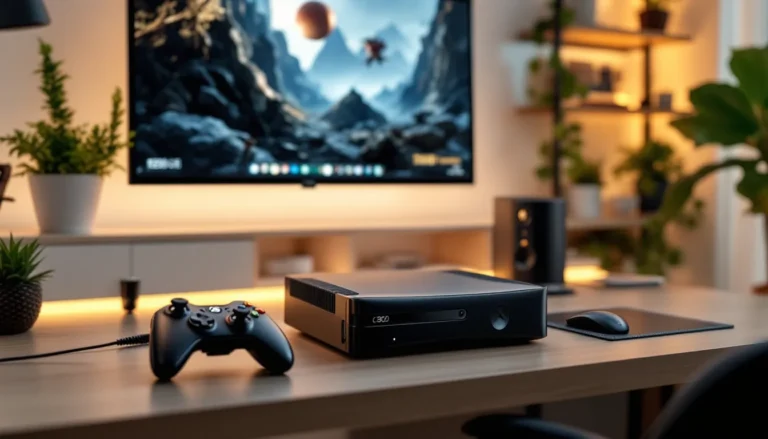
The Xbox 360 Blades Dashboard is the primary user interface that greeted players when they powered on their console during the Xbox 360’s lifespan. Rather than the traditional grid or list layouts gamers might’ve expected, Microsoft introduced a revolutionary blade-based system, imagine flipping through a deck of cards, except each card is a different function or feature. The dashboard launched alongside the console itself in November 2005 and remained the standard interface throughout multiple iterations until the New Xbox Experience rolled out in 2008.
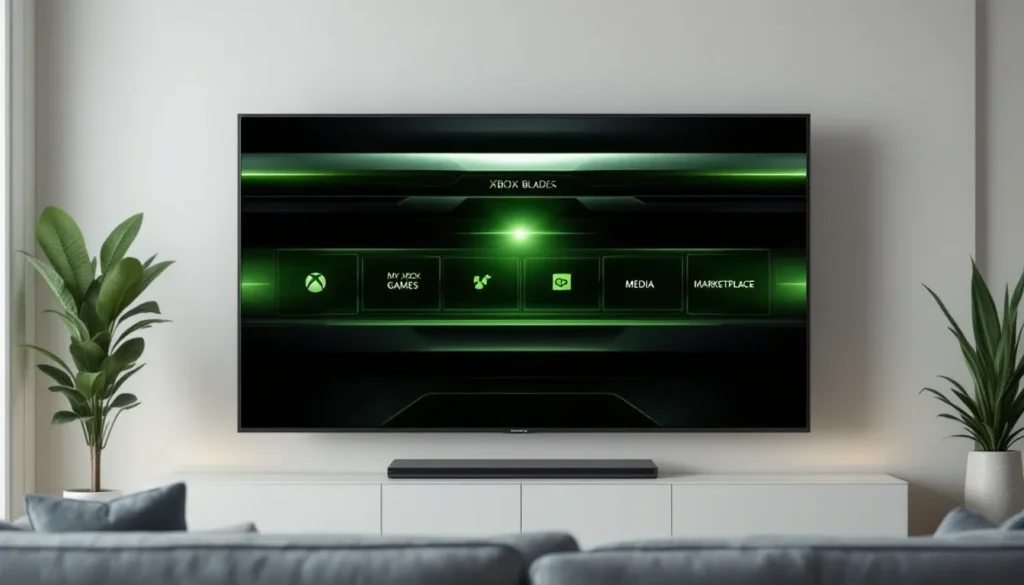
The Blades Dashboard consisted of five main sections, each represented by a “blade”, a vertical panel that expanded when selected. These weren’t just menu options: they were functional spaces where players could browse games, manage their profile, access media, connect socially, and customize their console experience. The distinctive green and black color scheme, paired with a sleek metallic aesthetic, became synonymous with the early Xbox 360 era. Even as newer dashboard updates came and went, the Blades design left an indelible mark on how gamers thought about console interfaces.
A Brief History Of The Iconic Interface
When the Xbox 360 first launched in 2005, the gaming industry was still figuring out how consoles should present information to players. Microsoft made a bold bet with the Blades Dashboard, designed to feel modern and intuitive while organizing a growing library of games, content, and features. The original Blades interface was built for a time when digital downloads were minimal, most games came on discs, and the dashboard’s primary job was helping players navigate their collection quickly.
The interface remained relatively stable through the Xbox 360’s first few years, gaining respect from players who appreciated its speed and logical structure. But, as the console aged and Microsoft pushed Game Pass, streaming services, and digital storefronts harder, the New Xbox Experience (NXE) arrived in November 2008. This update was a major departure, introducing a more grid-based interface with different visual styling. Even though this shift, many long-time Xbox players still refer to the original dashboard fondly and note that the Blades design aged better than some subsequent overhauls.
Today, the Blades Dashboard is frozen in time, playable only on original or early Xbox 360 consoles running unpatched firmware, or through emulation and modding communities. According to discussions on gaming forums and Xbox 360 Archives, a growing segment of collectors and retro enthusiasts maintain original hardware specifically to experience the authentic Blades interface. This nostalgia hasn’t faded: if anything, it’s intensified as modern dashboards have become increasingly bloated with ads and suggestions.
Understanding The Core Navigation Structure
The Blade System Explained
The genius of the Blades Dashboard lies in its simplicity. Rather than a traditional hierarchical menu structure, the dashboard presented five main blades in a horizontal carousel:
My Xbox – This was your home base, displaying achievements, gamer profile stats, and system information at a glance. It’s where you’d see your reputation rating, friends list size, and any pending messages.
Games – The games library, organized by recent plays, all installed titles, or content you’d downloaded. This is where you’d launch any game on your system.
Media – Access to music, video, and photo content stored locally on your Xbox or on USB storage devices.
Marketplace – Your gateway to purchasing or downloading content, from full games to arcade titles, DLC, and themes.
Settings – System configuration, network settings, parental controls, and storage management.
Each blade could be highlighted and selected, expanding to show relevant options and content beneath it. The navigation was spatial, you felt like you were moving through a physical space rather than clicking through nested menus.
How To Navigate Between Blades
Navigation was almost embarrassingly straightforward, which is a compliment in interface design. Using your controller, you’d simply press left or right on the D-pad or analog stick to cycle between blades. The current selection would illuminate, and sub-options would appear below. If you wanted to jump to a specific blade, you could also use the bumpers to scroll faster or directly highlight options within each blade.
This flat structure meant no more burrowing through submenus, everything was accessible in two or three button presses. Compare this to modern dashboards where finding a specific setting or game can feel like a chore, and you understand why players still praise the Blades design. The speed and responsiveness of navigation made the 360 feel snappier than competing consoles at the time, and that responsiveness became part of the Xbox brand identity.
Key Features Of The Blades Dashboard
Games And Entertainment Options
The Games blade was the hub for your entire game library. After you’d played more than a handful of titles, the dashboard would automatically categorize games by recent usage, giving your most-played titles priority positioning. You could also manually sort by name, install date, or genre, and the interface would remember your preference.
Beyond launching games, the Games blade also displayed achievements associated with each title. Hover over a game, and you’d see achievement progress, unlock notifications, and sometimes game-specific content. The Arcade section, Microsoft’s digital store for smaller, indie-style games, had its own dedicated area, which was revolutionary for 2005. While today’s digital storefronts are standard, the Xbox Arcade represented one of the first successful attempts at legitimate digital distribution on a home console.
Media And Content Management
The Media blade was your entertainment hub for non-gaming content. You could play music files stored on your console’s hard drive, watch videos, or view photo galleries. During the Xbox 360’s peak, many players used the console as a media center, it supported a wide variety of formats and could stream content from networked computers through Windows Media Player. This was a huge selling point when media streaming felt cutting-edge.
Content management on the Blades Dashboard was intuitive. You could navigate folders, create playlists, and even queue up music to play while gaming. The interface displayed album art, track information, and playback controls without ever forcing you into a full-screen music player. By today’s standards, these features seem basic, but they were genuinely convenient in the mid-2000s.
Social And Multiplayer Integration
The My Xbox blade was where social features lived. Your friend list, achievements, and gamer profile were all accessible from this central hub. You could send messages to friends, check who was online, and see what games they were currently playing, features that feel standard now but were genuinely innovative for a console in 2005.
Party features, added in later Xbox 360 updates, became deeply integrated into the dashboard. You could create a party, invite friends, and maintain persistent voice chat across multiple games. The social infrastructure was tied to your Xbox live account and achievements, creating a unified experience where your reputation, achievements, and social standing were always visible. This social-first approach influenced how multiplayer gaming would be approached for the next generation.
Customization And Personalization Tips
Creating And Managing Your Gamer Profile
Your gamer profile was the heart of your identity on Xbox 360. The profile stored your gamer tag, avatar, achievements, friends list, and in-game statistics. Setting up and personalizing your profile was straightforward, you could choose a custom avatar appearance by adjusting body type, clothing, and accessories, though avatar customization was later enhanced through paid cosmetic packs.
Profiles were tied to your Xbox Live account, which meant your data synced across multiple consoles. If you had a saved profile on your console, you could sign into any other Xbox 360, and your friends list, achievements, and preferences would be there. This was one of the first times console gaming offered true account portability, and it became a template for how digital accounts would work across platforms.
Managing your profile also meant managing your reputation. The Xbox Live reputation system tracked how you behaved in multiplayer, were you a cheater? Did you quit ranked matches? Did other players report you for toxic behavior? Your reputation rating was visible to other players, creating social accountability in the multiplayer space.
Organising Your Game Library And Themes
As your game collection grew, organization became important. The Blades Dashboard let you organize your library in several ways: by recent play, alphabetically, by number of achievements earned, or by installation date. You could create custom groups or categories if you had a massive collection, though this feature varied depending on dashboard updates.
Themes were another customization option that truly personalized the Blades experience. Microsoft released licensed themes featuring popular franchises, Halo, Gears of War, Mass Effect, and others. These themes didn’t just change colors: they replaced background music, adjusted the color scheme, and sometimes added custom sounds and visual effects. Purchasing a theme was a genuine way to show your loyalty to a franchise and make your dashboard feel distinctly yours. The Xbox 360 Star Wars Edition famously shipped with exclusive Star Wars-themed dashboard elements that became collector’s items. Even today, finding original theme packs from the Blades era is a pursuit for serious collectors.
The Blades Dashboard Vs. Modern Console Interfaces
Why The Blades Design Stood Out
The Blades Dashboard succeeded because it solved a specific problem: how to present a growing amount of console functionality without overwhelming players. In 2005, consoles were primarily gaming devices first, multimedia hubs second. The blade design respected this priority, you could get to your games in seconds, launch a title, and get playing. Everything else was organized in parallel, not hidden behind nested menus.
The visual design was also ahead of its time. The metallic textures, the sleek transitions between blades, and the overall aesthetic conveyed premium quality. Compared to the utilitarian menus of PS2 or the more colorful but less organized layouts of GameCube, the Blades Dashboard felt sophisticated.
Speed was another differentiator. The dashboard loaded quickly, scrolling was responsive, and transitioning between sections felt smooth and immediate. This responsiveness created a sense of control, players felt like they were commanding the console, not waiting for it to process their input.
How It Compares To Current-Gen Dashboards
Modern dashboards, from PlayStation 5 to Xbox Series X
|
S, prioritize content discovery and game pass integration over simplicity. The PS5 dashboard uses dynamic cards and media showcases. The current Xbox dashboard emphasizes Game Pass recommendations, cloud saves, and quick resume functionality. Both are feature-rich, but neither has the elegant simplicity of the original Blades.
Current generation dashboards are also slower to navigate when you know what you want. Finding a specific game in your library often requires scrolling through suggested content or trending titles first. The Blades Dashboard would get you to your games immediately. According to recent discussions on Windows Central’s Xbox coverage, even modern Xbox players occasionally express nostalgia for the straightforward navigation of the Blades era.
There’s also the advertising aspect. Modern dashboards are packed with promotional tiles, game pass showcases, and seasonal events. The Blades Dashboard, by contrast, was relatively ad-free, it showed you what you owned and what you could buy, but it didn’t bombard you with suggestions or limited-time offers. For players who just want to launch a game without distraction, this is a significant loss in functionality and user experience.
That said, modern dashboards are more powerful. Quick Resume on Xbox Series X
|
S, for example, is more sophisticated than anything the Blades era could offer. The tradeoff is clarity and speed for sophistication and feature density, not necessarily a bad choice for modern gaming, but a different philosophy entirely.
Nostalgia And Legacy: Why Gamers Still Remember The Blades
Nearly 20 years later, the Blades Dashboard remains a point of nostalgia for everyone who spent significant time on Xbox 360. The dashboard represents a specific era of gaming, when consoles were primarily gaming devices, when digital distribution was novel, and when user interfaces prioritized clarity over content saturation. Powering on a 360 with the Blades dashboard today feels like stepping into a gaming time capsule.
The cultural impact of the Blades interface extended beyond the Xbox itself. Game UI designers studied how Microsoft organized complexity without overwhelming users. The blade-based navigation influenced how other interfaces approached organizing large amounts of content. Even non-gaming applications borrowed concepts from the Blades design philosophy.
What’s particularly interesting is that nostalgia for the Blades Dashboard has remained strong enough to drive a collector’s market. People seek out original Xbox 360 consoles specifically to experience the unmodded Blades interface. Communities focused on maintaining and jailbreaking Xbox 360 hardware often discuss preserving the original dashboard experience as part of gaming history preservation. The jailbroken Xbox 360 market reflects not just interest in emulation or ROM loading, but genuine nostalgia for the hardware and software ecosystem of the Xbox 360 era.
Players also remember the Blades era because it was a genuinely unified social ecosystem. Your achievements, friends list, and reputation were all interconnected and visible. Modern gaming has fragmented this, achievements are tracked but less visible, social features are scattered across Discord, Twitch, and platform-specific apps, and the sense of a cohesive online community feels more dispersed. The Blades Dashboard represented a moment when a console manufacturer successfully created a centralized digital identity for players, and that achievement hasn’t been replicated as effectively since.
The dashboard also represents a time when Microsoft took genuine design risks. The blade concept could’ve failed, it was unconventional. But Microsoft committed to it, refined it, and created something that looked and felt genuinely original. In an era where many console interfaces now follow similar design patterns, the boldness of the Blades approach stands out in retrospect.
Conclusion
The Xbox 360 Blades Dashboard was more than just a user interface, it was a defining element of early 2000s gaming. Its elegant simplicity, responsive navigation, and thoughtful organization set a standard that modern dashboards have struggled to match in terms of pure usability. While contemporary interfaces offer more features and deeper integration with services like Game Pass and cloud gaming, they often sacrifice the clarity and speed that made the Blades Dashboard so beloved.
Today, experiencing the Blades Dashboard requires either owning original hardware or diving into the collector’s market. The Xbox 360 consoles available for sale that retain original firmware remain sought-after by enthusiasts who want to experience that authentic dashboard experience. Whether you’re a long-time Xbox player revisiting your roots or a newer gamer curious about console history, the Blades Dashboard represents an important chapter in how we think about interface design and user experience in gaming.
The legacy of the Blades Dashboard extends beyond nostalgia, it’s a reminder that good design prioritizes what users actually need and gets out of the way. As modern dashboards continue to evolve with more features and more content, there’s ongoing value in remembering why the Blades approach worked so effectively. It’s a lesson that resonates in gaming and far beyond.